TCP Working: 3-Way Handshake & Reliable Communication
Search for a command to run...
No comments yet. Be the first to comment.
You are on a flight. Airplane mode is on. You text your friend. The app doesn't crash. It shows a clock icon. Later, you land. The message sends. How? Internet is unreliable. Tunnels, elevators, bad c
Direct DOM manipulation is slow. Updating the screen directly forces the browser to recalculate layouts and repaint pixels. Do this too often, your app lags. React solves this. How? The Virtual DOM. T
Building a todo app is easy. Building Instagram is hard. The difference isn't the code. It's the architecture. Let's look at how massive mobile apps scale using React Native and Expo Router. No fluff.
How to organize your code like a pro using ES6 modules The Problem: Why One Giant File Doesn’t Scale When you first start learning JavaScript, it’s tempting to put everything in a single app.js file.

Introduction: The Sync vs. Async Reality Check Imagine you're building a web server that needs to read a file from disk. In a traditional, synchronous world, your code would look something like this:

When you open a website, send a message, or upload a file, your data travels across many networks before reaching its destination. But the internet is messy - packets can get lost, arrive late, or show up out of order.
So how does your browser still load a complete webpage correctly?
The hero behind this reliability is TCP - Transmission Control Protocol.
Let’s break it down step by step.
Imagine sending pages of a book to a friend using postcards.
Some postcards get lost. Some arrive out of order. Some arrive twice. Some get smudged and unreadable.
That’s exactly what can happen when data moves across the internet. Networks are not perfect. Devices crash, cables fail, routers drop traffic when busy.
If we just “send and hope,” we’d get:
Broken downloads
Corrupted images
Half-loaded websites
Duplicate messages
Clearly, we need rules to make communication dependable.
That’s where TCP comes in.
TCP (Transmission Control Protocol) is a communication protocol that ensures reliable, ordered, and error-checked delivery of data between two devices.
It works at the Transport Layer of the Internet model, sitting between applications (like browsers) and the network (IP).
Think of it as a delivery manager that:
Tracks every piece of data
Makes sure nothing is lost
Re-sends missing pieces
Puts everything back in the correct order
Without TCP, the modern web would be chaos.
TCP was built to handle real-world network problems:
| Problem | What Can Go Wrong | How TCP Helps |
| Packet Loss | Data disappears in transit | Retransmits missing data |
| Out-of-Order Delivery | Packets arrive shuffled | Reorders before delivery |
| Duplication | Same packet arrives twice | Detects and discards duplicates |
| Data Corruption | Bits flip due to errors | Uses checksums to detect errors |
| Network Overload | Too much data floods network | Uses congestion control |
| Receiver Overload | Receiver can't process fast enough | Uses flow control |
TCP doesn’t assume the network is reliable - it creates reliability on top of an unreliable system.
Before sending actual data, TCP needs to establish a connection. Both sides must agree to communicate and synchronize important information like sequence numbers.
This setup process is called the 3-Way Handshake.
Think of it like starting a phone call:
“Hello, can we talk?”
“Yes, I can hear you. Can you hear me?”
“Yes, great - let’s talk.”
Only after this exchange does real conversation begin.
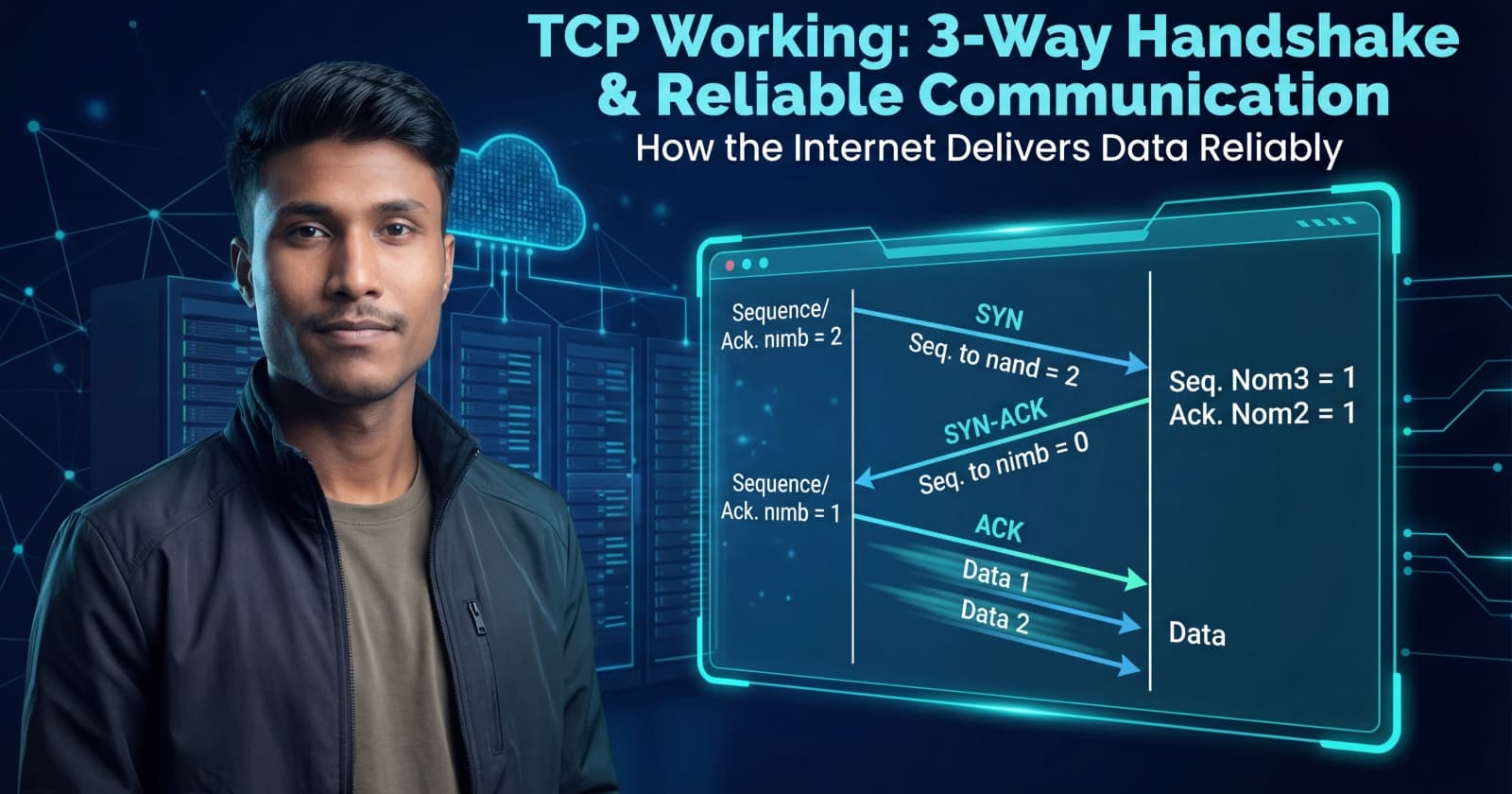
Here’s how two devices (Client and Server) start a TCP connection.
The client sends a packet with the SYN flag set.
It also sends an initial sequence number (ISN).
Meaning:
“Hi, I want to start a connection. My starting number is X.”
The server responds with:
SYN flag (to start its side)
ACK flag (acknowledging the client)
Meaning:
“Got your request. My starting number is Y. I acknowledge your X.”
The client sends a final ACK.
Meaning:
“I received your Y. We’re synced. Let’s start sending data.”
Connection established 🎉
Once the connection is established, data transfer begins.
TCP does not send everything blindly. It carefully tracks each byte.
Every byte of data has a sequence number. If a packet contains 500 bytes starting at sequence 1000, the next expected byte is 1500.
The receiver sends ACKs saying:
“I have received everything up to byte N.”
This is called a cumulative acknowledgement.
TCP uses several mechanisms:
If the sender doesn’t receive an ACK in time, it assumes the packet was lost and sends it again.
Packets may arrive out of order, but TCP rearranges them using sequence numbers before passing them to the application.
If a packet is received twice, TCP recognizes the sequence number and discards the extra copy.
Each packet has a checksum. If data is corrupted, the receiver discards it and the sender retransmits.
Let’s say packet 2 is lost:
The server keeps asking for the missing data by repeating the last ACK number it received successfully.
Ending a TCP connection is a controlled process, not a sudden stop.
It usually involves four steps and uses the FIN flag.
One side sends FIN → “I’m done sending data.”
Other side sends ACK → “Got it.”
Other side sends its own FIN → “I’m also done.”
First side sends ACK → “Connection closed.”
This ensures both sides finish cleanly and no data is lost.
❌ TCP and HTTP are the same ✔ HTTP runs on top of TCP
❌ TCP guarantees fast delivery ✔ TCP guarantees reliable delivery, not always the fastest
❌ Packets always arrive in order ✔ TCP fixes the order — the network doesn’t
TCP is the reason the internet feels reliable even though the underlying network is unpredictable.
It:
Establishes a connection with a handshake
Tracks every byte using sequence numbers
Confirms delivery with acknowledgements
Retransmits lost data
Closes connections safely
Without TCP, loading a webpage would feel like assembling a puzzle with missing pieces.